Written by Akos Csiszer
Introduction
TLS is today’s de-facto standard protocol for accessing web applications, and it is used widely as a transport layer protocol for other applications as well. It provides end-to-end encryption which prevents security appliances on the network path looking into the packet content for policy enforcement and malware protection.
Security vendors, including Versa, have developed a technique called TLS Decryption to look at the content of the flow. Access to the data flow is required for security features, like inline CASB (Cloud Access Security Broker), malware protection, data-loss prevention. Without looking at the content the visibility of the security appliance is limited only to the IP and TCP/UDP headers. In some cases, the TLS Decryption is not possible; the purpose of this document is to walk through the possible bypass solutions.
How TLS Decryption works
TLS Decryption is an industry standard method on security appliances to decrypt, inspect and re-encrypt TLS traffic.
When a user connects to a web page natively, not through a man-in-the-middle device, such as Versa SSE Gateway, the web server presents a certificate which is issued by a trusted public Certificate Authority. The list of trusted public Certificate Authorities is maintained on the end user operating system and regularly updated.
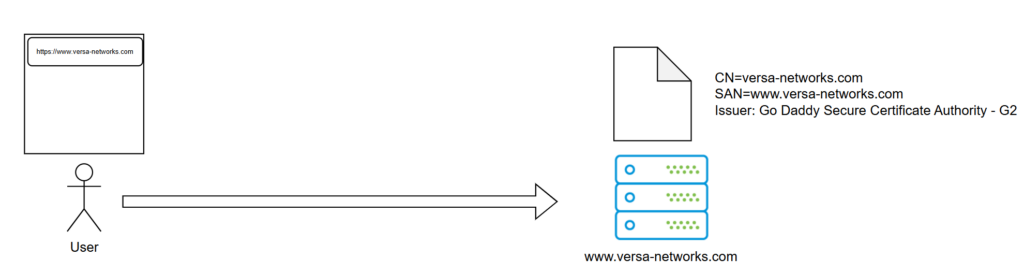
Figure 1 Normal TLS connection without VSG in the path
On the above figure, the user is typing the www.versa-networks.com in the browser to connect to the web site. During the TLS handshake, the web server sends its certificate to the browser for validation. This checks if the user entered domain name matches to the CN (Common Name) or SAN (Subject Alternative Name) of the certificate and if the certificate issuer is trusted. In the above case the requested FQDN, www.versa-networks.com is in the SAN field of the certificate and the Go Daddy Secure Certificate Authority – G2 is trusted. The browser checks other fields, like validity dates and revocation list, but they are not relevant for this document.
Now the user is connected via the Versa SASE client to a Versa Secure Gateway configured with TSL Decryption and accesses the same website. The VSG breaks the TLS connection at the very beginning and performs a Man-in-the-Middle attack to inspect the content. It acts as a server towards the user and as a client towards the server. The VSG generates and signs a new certificate for www.versa-networks.com (it takes also the SAN field of the original certificate) and then presents it to the user.
The user‘s browser checks the certificate and finds no issues, so the user becomes no warning and can surf like he was connected directly. The user’s device trusts the issuer, VOS Certificate, because it was added to the Trusted Certificates Store at the time of the SASE client registration to the Versa Secure Gateway.
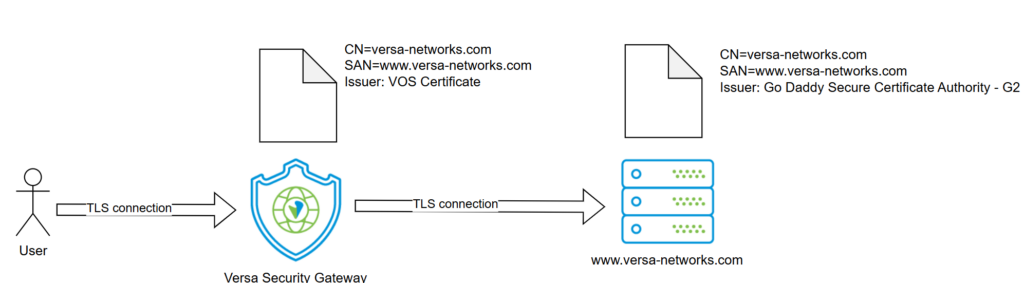
Figure 2 TLS connection with VSG and TSL Decryption in the path
In Versa Analytics you can see entries in the SASE Web monitoring logs showing that the traffic was decrypted by the VSG.

Figure 3 Logs in Versa Analytics
You can compare the certificates in the client browser which were put below. You can see that on the left side, the certificate issuer is the Go Daddy Secure Certificate Authority – G2, while on the right side (connection through VSG with TLS Decryption enabled), the issuer is the VOS Certificate, and the Organization name is Versa-SSE which matches to the Enterprise Name where the client is connected to.
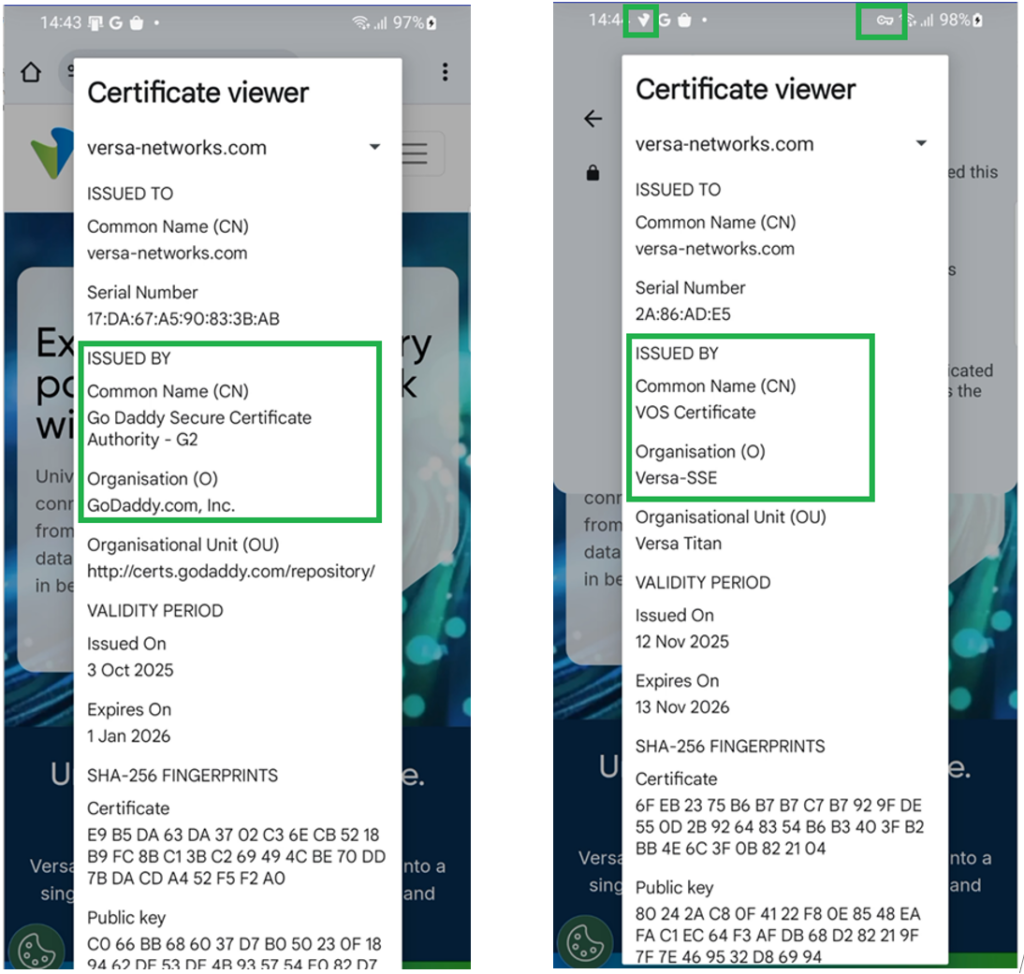
Figure 4

Figure 5 Left side: Certificate without connecting to the VSG. Right side: certificate through VSG with TLS Decryption
When the TLS decryption is not possible…
TLS Decryption works fine in many cases, especially when the client application is a generic browser, like Chrome, Firefox or MS Edge. If not a browser, but an application running on the client side (typical example an Android / IOS application downloaded from store), it can perform further checks on the server’s certificate beside just trusting the issuer CA. One common technique is to check if the hash of the public key of the presented certificate to see if it matches to a stored known “good” trusted value. Another technique is not to use the default Certificate Trust store of the operating system but trust only a specific CA which issues the servers’ certificate. These techniques are commonly called certificate pinning and are used to prevent Man-in-the-Middle attacks. Certificate pinning prevents the TLS decryption also on the Versa Secure Gateway and all other vendor’s appliances.
TLS decryption is also not possible when mTLS (mutual TLS) is used. With mTLS the client and server sides are mutually authenticating themselves with certificates.
Static bypass for well-known applications
Versa implemented an implicit TLS decryption bypass for some well-known applications using either certificate pinning or mTLS. TLS traffic to these destinations is automatically bypassed, even though there is a rule enforcing decryption. The actual list can be found in the official documentation here.
One well-known application on the list is WhatsApp. To demonstrate the bypass, the following TLS Decryption rule was created in Versa Concerto (Concerto is Versa’s single pane of glass orchestration platform). This rule was put on the top and matched on all traffic from the user kolorsztar@gmail.com.

Figure 6 TLS Decryption rule
On an Adoird mobile device WhatsApp was installed from the store and started. The application worked fine. In the Concerto SASE Web monitoring logs, you can see that while having all other traffic TLS decrypted, the WhatsApp traffic was not decrypted.
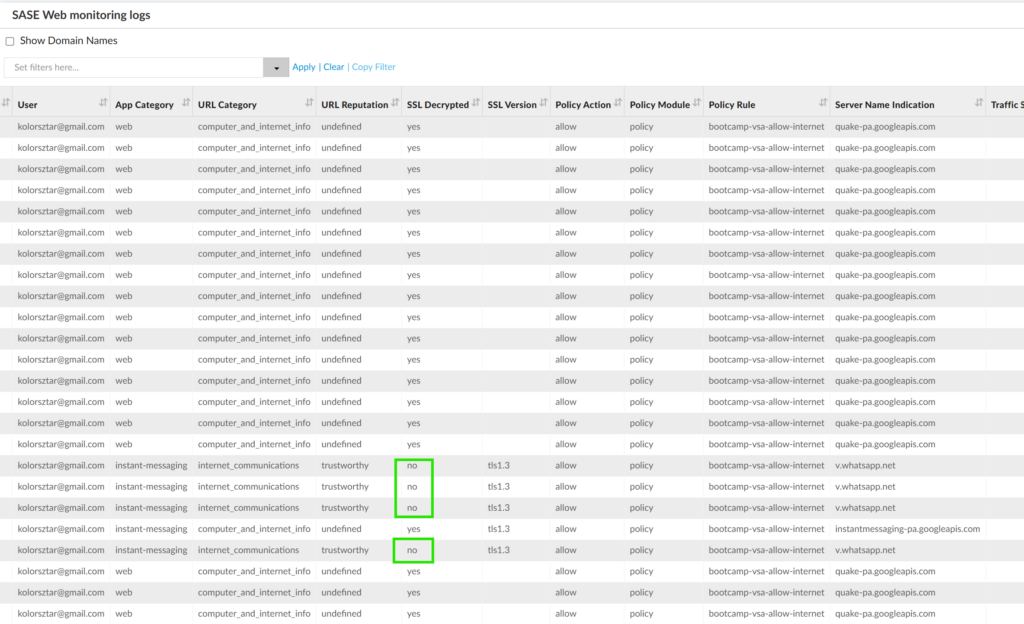
Figure 7 Static TLS bypass for WhatsApp
It’s important to note that this decryption bypass happens always, regardless of the client. When v.whatsapp.net (used by the WhatsApp app from the store) was called from a simple web browser, which didn’t do certificate pinning, the encryption was also bypassed. Below you can see the certificate details from the browser. The key icon in the top next to the Wi-Fi signal strength shows that the mobile device was connected to the VSG.
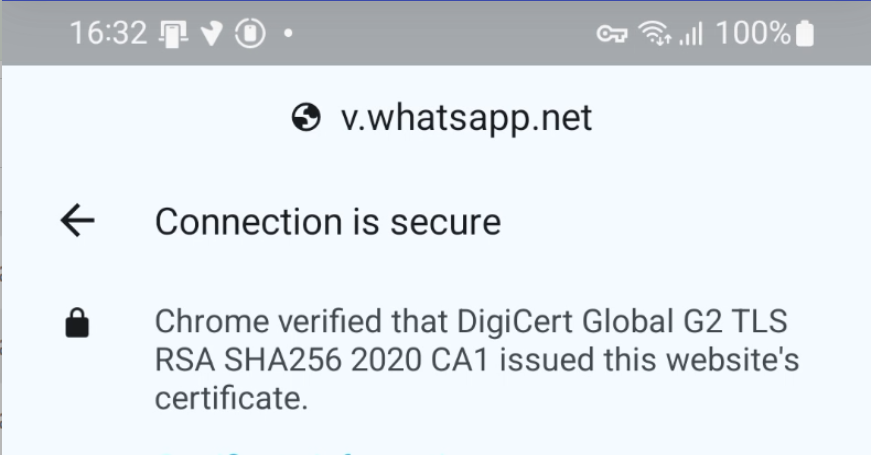
Figure 8 v.whatsapp.net certificate details from browser
The Analytics logs also showed that the TLS Decryption didn’t happen.
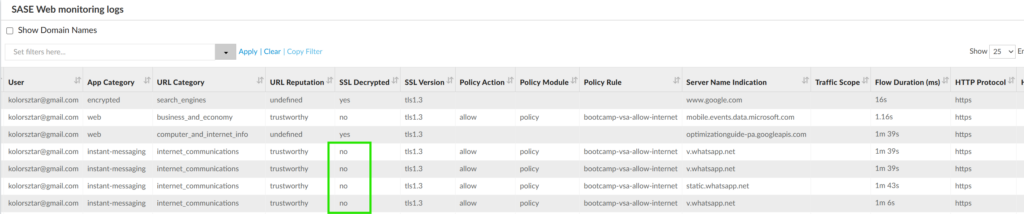
Figure 9 Analytics logs showing the v.whatsapp.net is bypassed for decryption
As a side note the v.whatsapp.net is not usable in the browser:
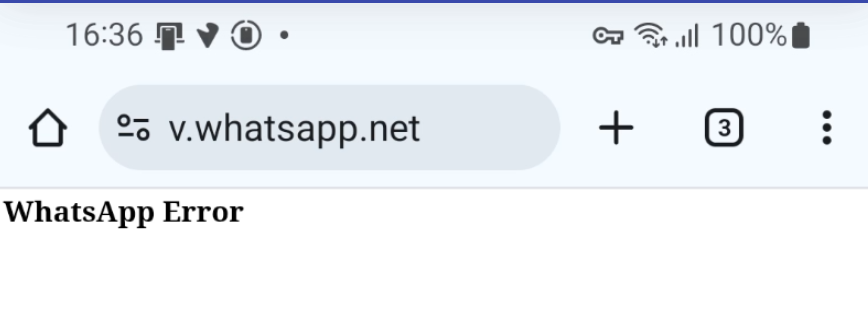
Figure 10 v.whatsapp.net is not usable in browser
The web version of WhatsApp is not on the bypass list; hence the traffic can be decrypted and policy enforced. Here is an example below, when the WhatsApp web was accessed through a browser and the traffic was decrypted.

Figure 11 WhatsApp web is not on the TLS bypass list
Dynamic bypass for certificate pinned applications
Even though the static bypass list is updated dynamically in the regularly released security packages, it still cannot cover all certificate pinned applications. Furthermore, in the above WhatsApp example, the browser version and the client-based version used different HTTPs endpoints, hence the client-based version can be bypassed, while having the browser-based traffic still decrypted. Other applications may use the same endpoint for both client-based and browser-based sessions. In such case the browser-based sessions should be decrypted for policy enforcement and malware prevention.
Versa has developed a feature to dynamically check if an application can function with TLS decryption or not. It’s called Dynamic Bypass of Certificate-Pinned traffic and can be enabled in the TSL decryption rule in Versa Concerto.
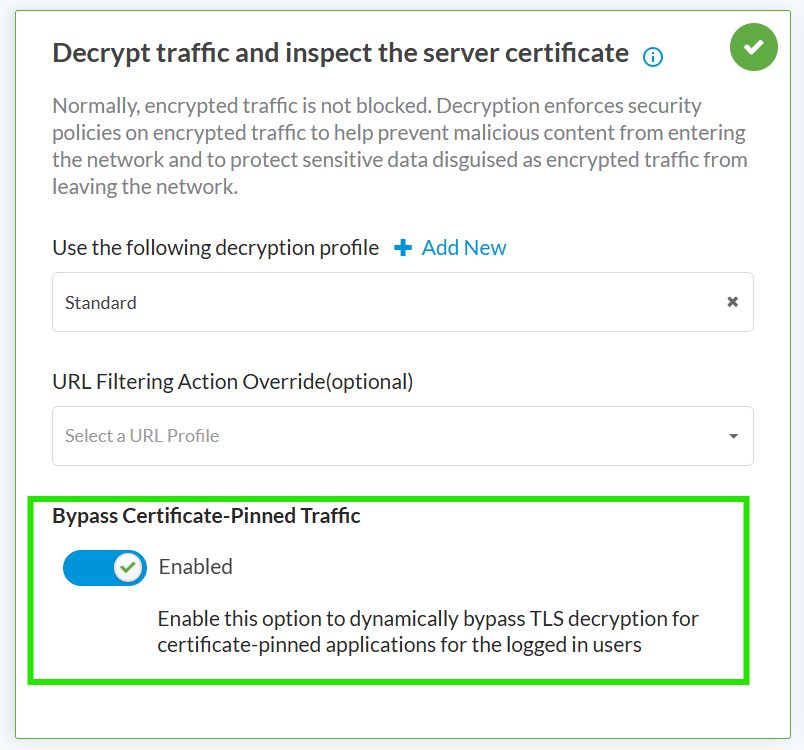
Figure 12 Enabled dynamic TLS decryption bypass
When this option is enabled and a destination FQDN is not on the static exception list, the Versa Secure Gateway tries to decrypt the traffic. If the TLS handshake fails, it puts the destination FQDN on an exception list for that user. This means that for the second attempt the traffic will have the decryption bypassed and TLS handshake will complete. From user experience point of view this means that the application must be started two times to succeed.
In the below example a German banking app is using certificate pinning and is not on static the exception list. At the first launch of the application, “The certificate is not trusted” error message was displayed (NOTE: the error messages originally were provided in German but they were translated with Google Translate). At the second launch, the application was complaining that an invalid username / password was given, which was expected as proper login credentials were not available for this test. This application was quite unique as it provided an exact error message showing the problem, while most of the applications provide just a general error message, like “check your internet connection”, “something went wrong”, “connection is not possible”.
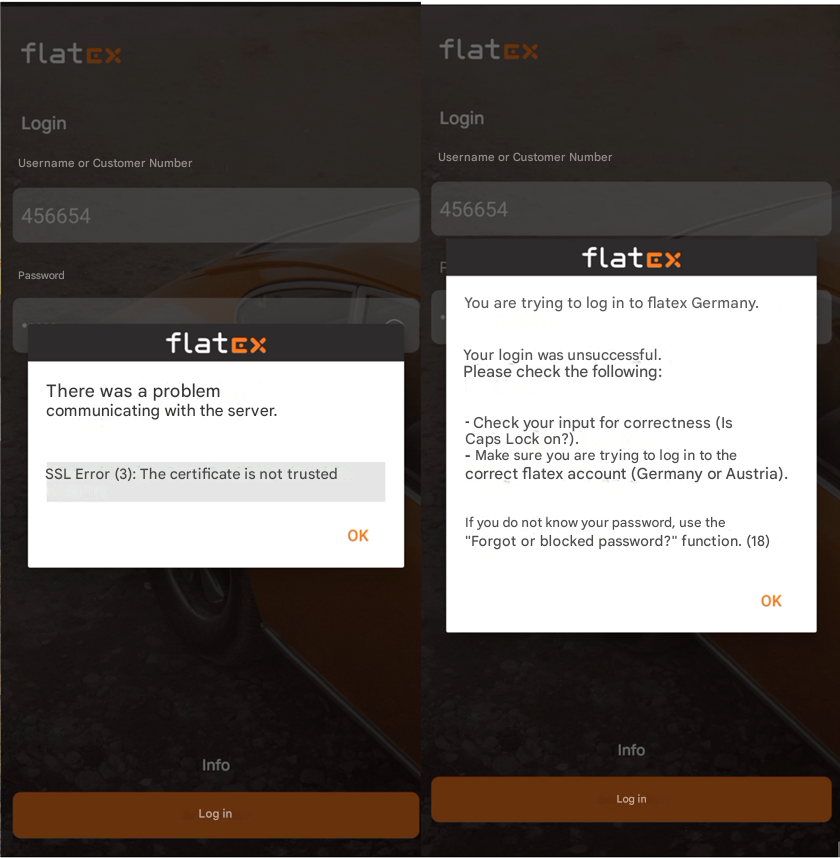
Figure 13 Left side: Certificate is not trusted, Right side: invalid username/ password (expected)
In Versa Analytics log entries for both connection attempts can be seen. Initially the Versa Secure Gateway tried to decrypt the traffic (SSL Decrpyted = yes), but because the TLS handshake failed, it put the konto.flatex.de on an exception list for that user. That’s why the second attempt was not decrypted; hence it succeeded.

Figure 14 Analytics logs for dynamic decryption bypass for certificate pinned traffic
If the user tries to reach the same destination from a browser, the traffic will not be decrypted, even though through browser the traffic could have been decrypted. This can be shown in the below example, when the same host (konto.flatex.de) was accessed through browser. You can see in the certificate details, that it was issued by Sectigo Public Server Authentication CA EV R36 and not VOS Certificate.
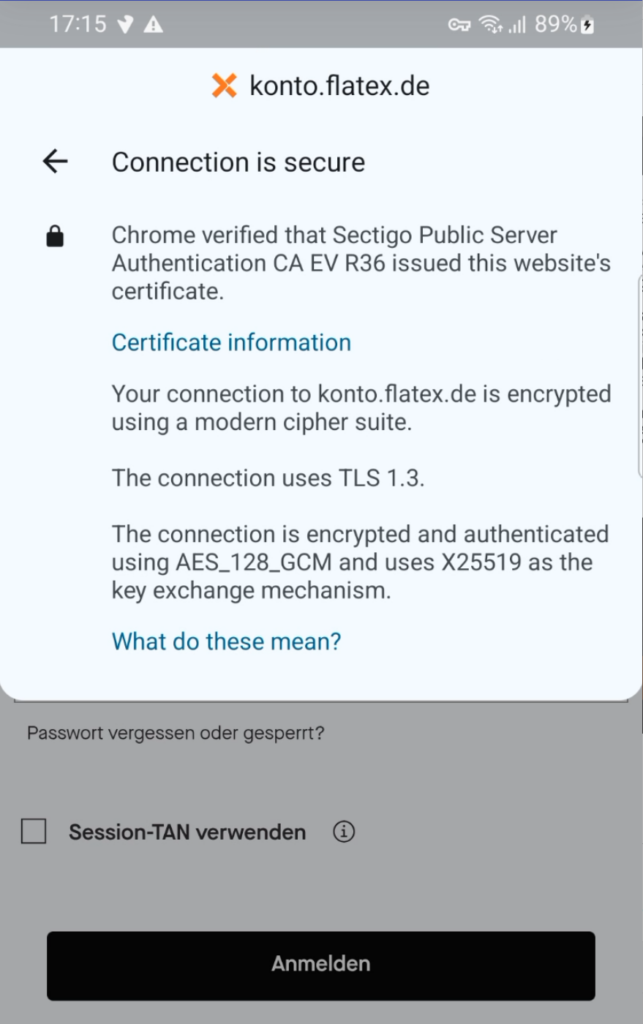
Figure 15 Browser access of a decryption bypassed destination
If you have direct access to the Versa Secure Gateway, where the user is connected to, you can check the list of exempted hosts for a given user. In the below example you can see that the konto.flatex.de is on the list.
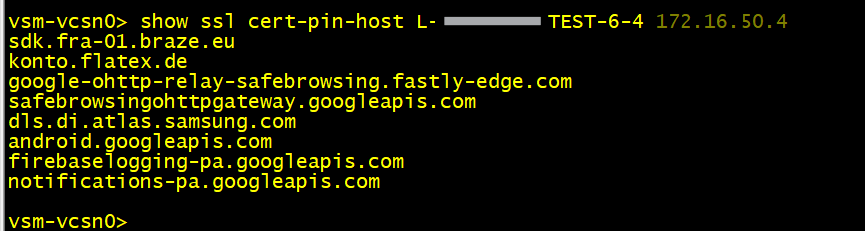
Figure 16 Dynamically exempted hosts
Summary
Certificate pinning and mutual TLS make it impossible for security appliances to inspect the traffic and protect the end user from malicious activity. Enforcing TLS Decryption for all traffic creates bad experience for users, because certificate-pinned & mTLS applications will no longer work.
Versa offers the following solutions:
- Versa managed static bypass for well-known applications. This is enabled always and cannot be disabled.
- Dynamic bypass can be enabled on a per-rule basis. The user-experience is moderate, because the certificate-pinned client application must be started two times. If within a session the application is accessed through browser and not through the client application, the traffic will be decrypted.
- Administrator managed bypass. Administrators can create a TLS decryption rule to bypass specific applications, URL categories. This is a static list and must be maintained manually. This enables the bypass not only for client-application initiated traffic but also for browser-initiated traffic, which anyway could have been decrypted.
One main reason for TLS decryption is to control cloud-based traffic with inline CASB. For some applications this can be achieved also using API-based CASB with integrated Data Protection (API-DP). This makes the traffic decryption on the appliance unnecessary, and security policy can be enforced even for certificate-pinned and mTLS applications. A blog post about this feature can be found here.