Table of Contents
- Introduction and Problem Statement
- Example Topology Details
- Adjusting BGP AS Path
- Adjusting BGP Community Assignment
- Verification and troubleshooting commands
- Appendix: Scenario with Redundant Peerings between Tenants
- Summary
Introduction and Problem Statement
There can be situations where LAN interfaces belonging to different SD-WAN tenants, or different VRs within the same tenant, or devices deployed in different Versa Headends are all connected to the same LAN network with BGP peering in place. In such cases, it may be necessary for these different entities to import each other’s prefixes over that LAN BGP peering, provided that their IP address spaces do not overlap. Most common real-world examples of these scenarios include peering between different parts of the same company, which are under different administrative control (so each part is deployed as a separate SD-WAN tenant). This can be demonstrated in the following diagram: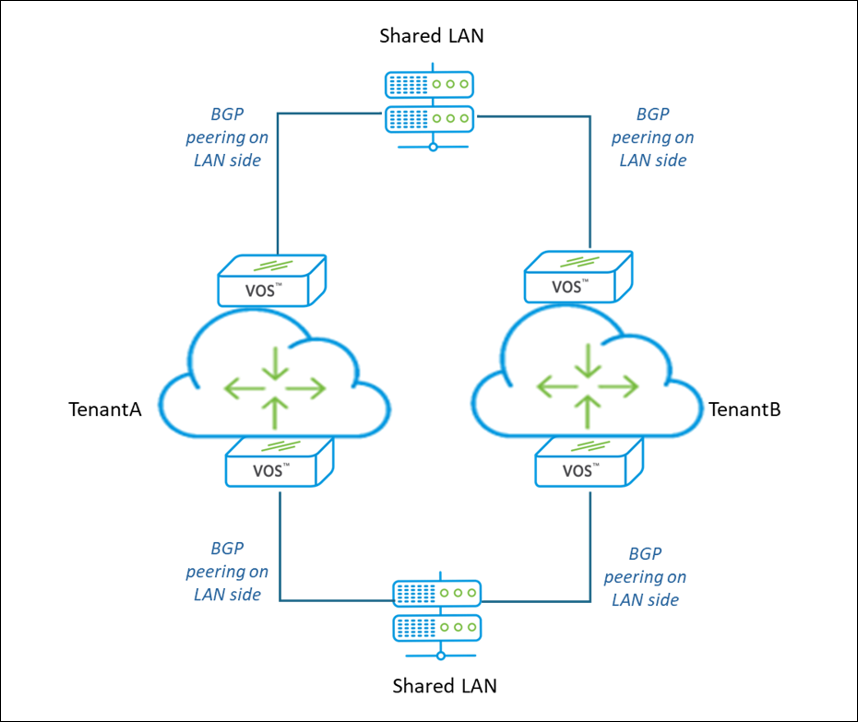 TenantA and TenantB in this diagram can be either Tenants on the same Versa Headend, or different Headends.
With default configuration on VOS routers, and assuming no special filtering on LAN switches, the typical situation will look following way:
TenantA and TenantB in this diagram can be either Tenants on the same Versa Headend, or different Headends.
With default configuration on VOS routers, and assuming no special filtering on LAN switches, the typical situation will look following way:
- LAN switches will have LAN prefixes and prefixes received from both Tenants
- TenantA will have LAN prefixes and own SD-WAN prefixes, but no prefixes from TenantB
- TenantB will have LAN prefixes and own SD-WAN prefixes, but no prefixes from TenantA
- VOS routers by default have filtering on LAN BGP group by SD-WAN BGP community 8009:8009 to prevent re-importing SD-WAN prefixes from LAN
- There can be the same AS 64514 present by default in the path for both Tenants
Example Topology Details
To demonstrate this approach, we would be using following topology: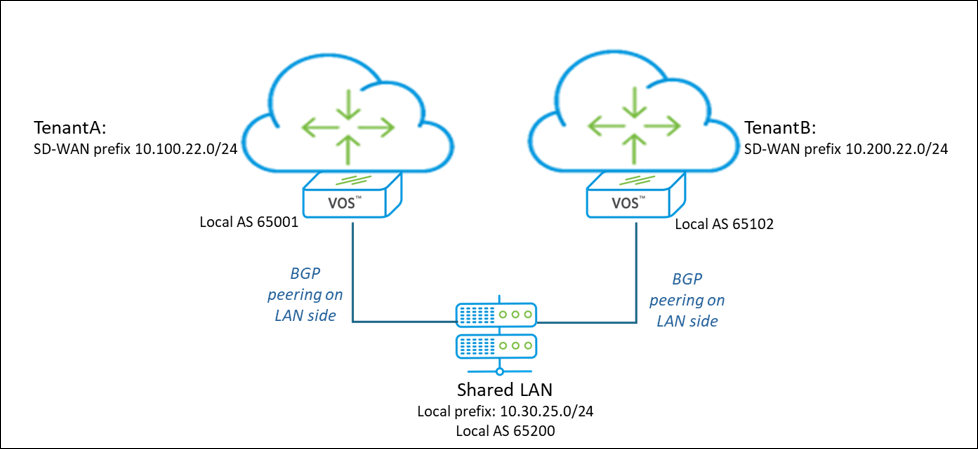 In initial state with workflow-generated BGP peering configuration on VOS routers, and no prefix filtering on Shared LAN switch, prefixes mentioned on diagram look following way:
- TenantA and TenantB VOS routers have only their respective Tenant’s SD-WAN prefixes and Shared LAN prefix.
- Shared LAN switch (besides its local LAN prefix) has both Tenants SD-WAN prefixes with following details:
- TenantA prefix 10.100.22.0/24:
- AS path: 65001 64514
- BGP communities: 8009:8009 8015:0
- TenantB prefix 10.200.22.0/24:
- AS path: 65102 64514
- BGP communities: 8009:8009 8015:0
- TenantA prefix 10.100.22.0/24:
Adjusting BGP AS Path
As shown in previous section, despite having unique local BGP AS assigned on VOS routers for LAN peering, SD-WAN prefixes, advertised from the LAN switch, have additional AS 64514 in the path, which is the default Local AS of the BGP instance (Configuration -> Networking -> Virtual Routers -> TenantX-LAN-VR -> BGP):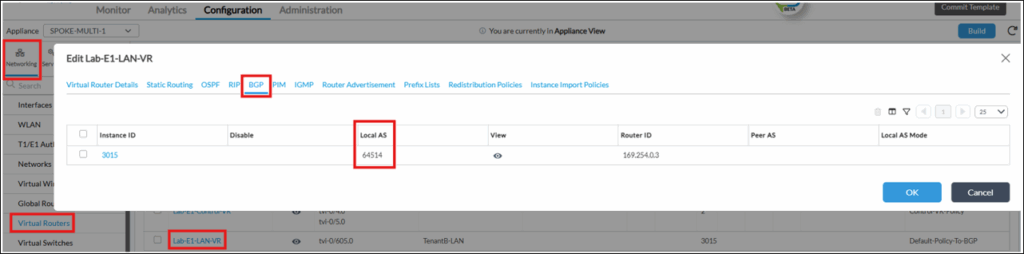 There are 2 ways how this can be adjusted (you can select only one):
- Change BGP Instance Local AS number to unique AS value, which is used for LAN BGP peering. This has to be done on LAN-VRs of both Tenants.
- (preferred) Change BGP Instance Local AS mode to 4 (Default is 2). The only difference between those modes with mode#2 local AS number configured for the BGP instance is prepended to the AS path, while with mode#4 – no. This has to be done on LAN-VRs of both Tenants in BGP Configuration section:
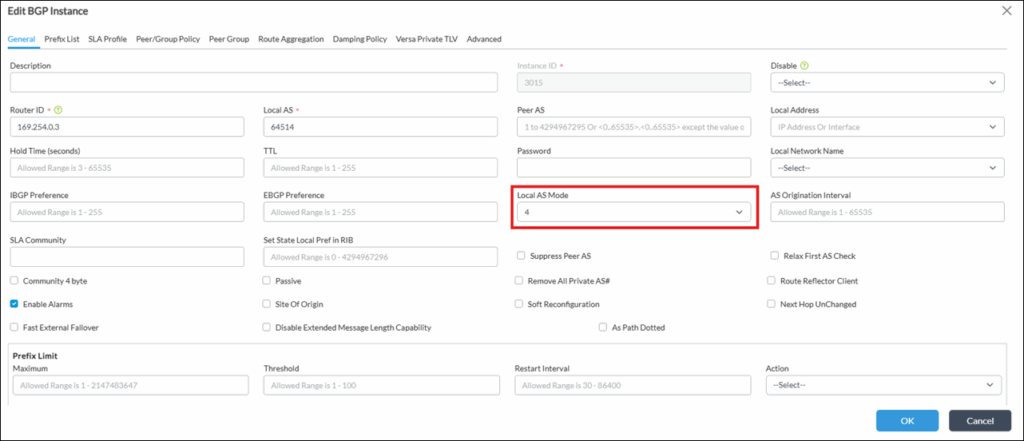 After this step AS#64514 should disappear from BGP AS path for prefixes of both Tenants, leaving only their unique AS used for peering. However, SD-WAN prefixes are not yet mutually imported from Shared LAN between Tenants, as community adjustment is still required.
Adjusting BGP Community Assignment
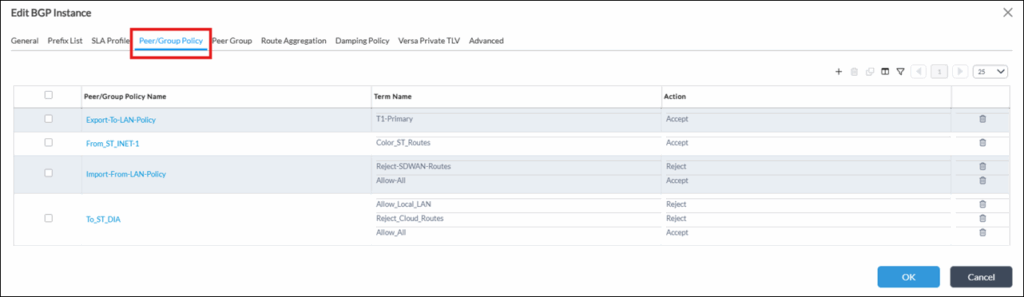
There is a default community 8009:8009, which is used on all VOS routers to identify SD-WAN prefixes. Typical usage scenarios for this community in BGP policies:- In “Import-From-LAN-Policy” to prevent re-importing of SD-WAN prefixes from LAN.
- In “To_ST_DIA” (used in Local DIA cases) to prevent advertising of SD-WAN prefixes to Transport-VR (leaving only LAN prefixes advertised).
- “Export-To-LAN-Policy” to replace standard 8009:8009 community with 28009:28009 when advertising to Shared LAN.
- “Import-From-LAN-Policy” to block prefixes with 28009:28009 community when importing them from Shared LAN.
1. Open TenantB-LAN-VR BGP instance configuration (Configuration -> Networking -> Virtual Routers -> TenantB-LAN-VR -> BGP), and switch to “Peer/Group Policy” Tab:
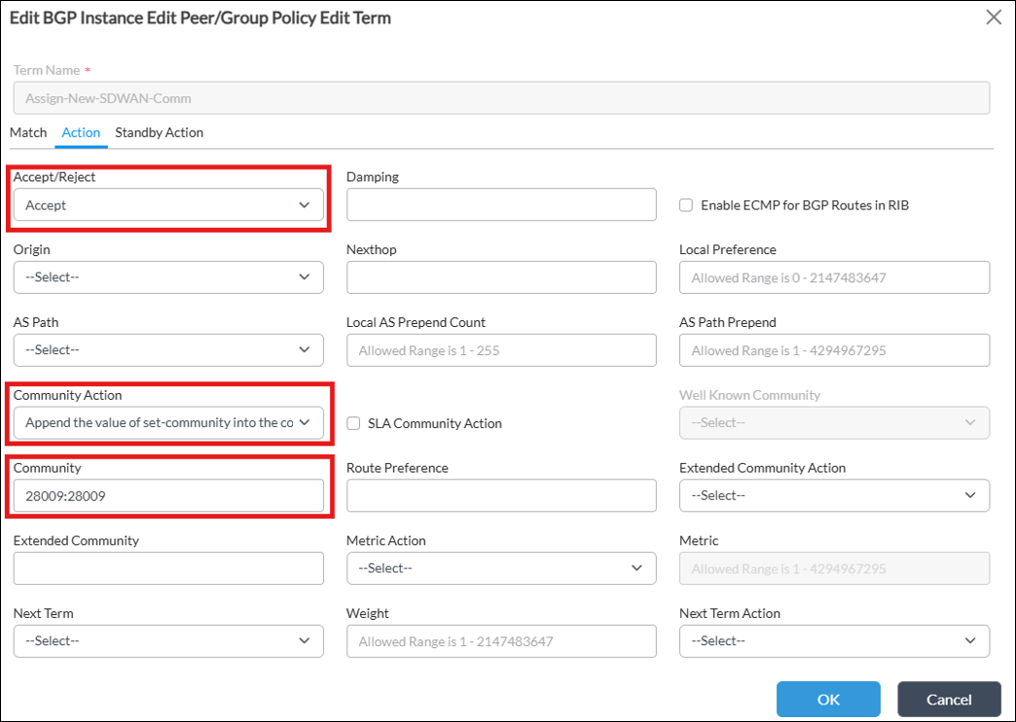
 2. Open “Export-To-LAN-Policy”, and create 2 new terms:
2.1. Term “Assign-New-SDWAN-Comm”: match anything and assign a new community 28009:28009:
 Additionally for routers deployed in HA Pairs it may be needed to have “Local AS Prepend Count” increased on the 2nd router in HA Pair.
2.2. Term “Replace-SDWAN-Comm”: match prefixes with community “8009:8009”, and actions:
2.2.1. Community action: “Remove all communities that match set-community”
2.2.2. Community: 8009:8009
2.2.3. Next Term: “Assign-New-SDWAN-Comm”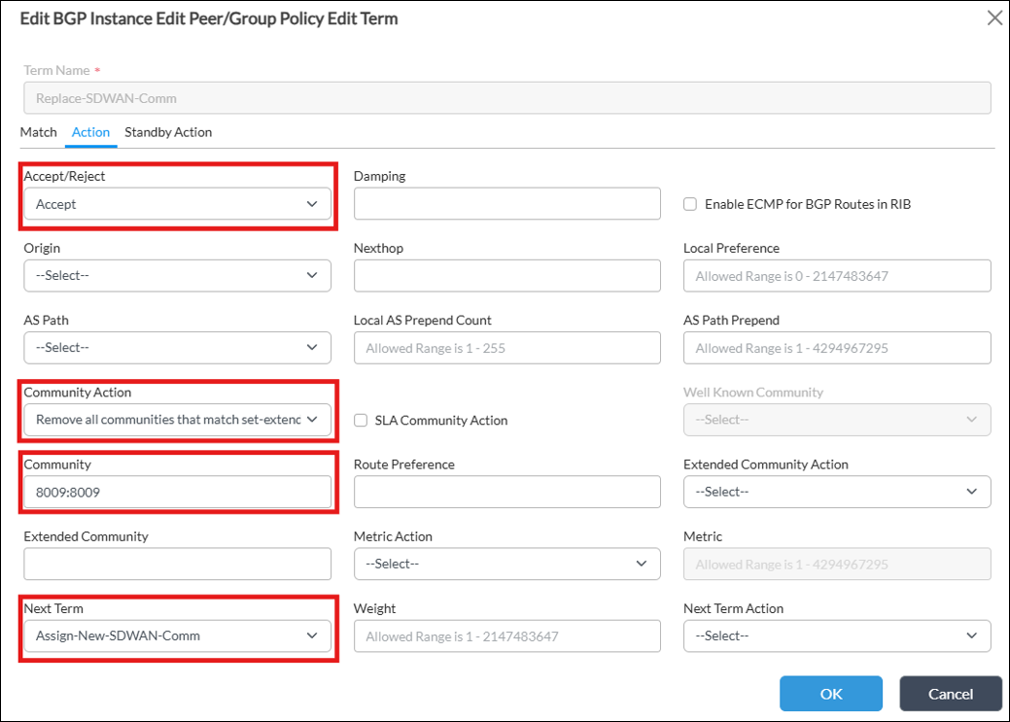 3. Arrange created Terms in a following order:
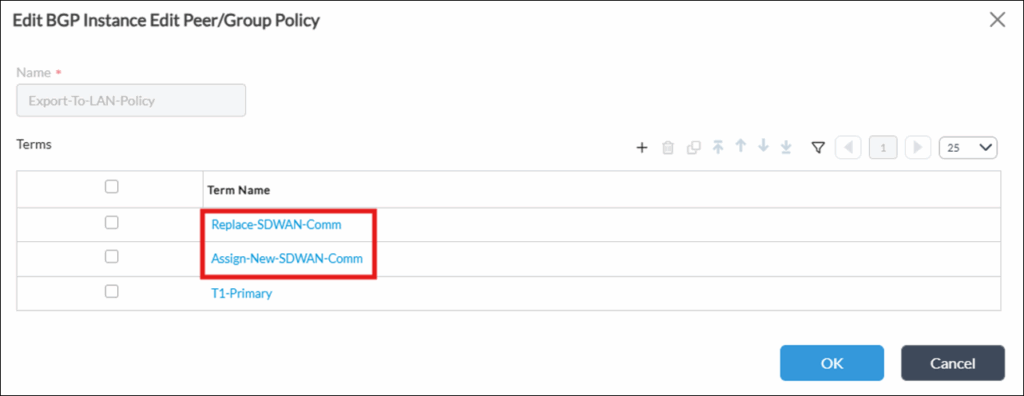 4. Open “Import-From-LAN-Policy” and edit Term “Reject-SDWAN-Routes”- change Match Community to the new 28009:28009:
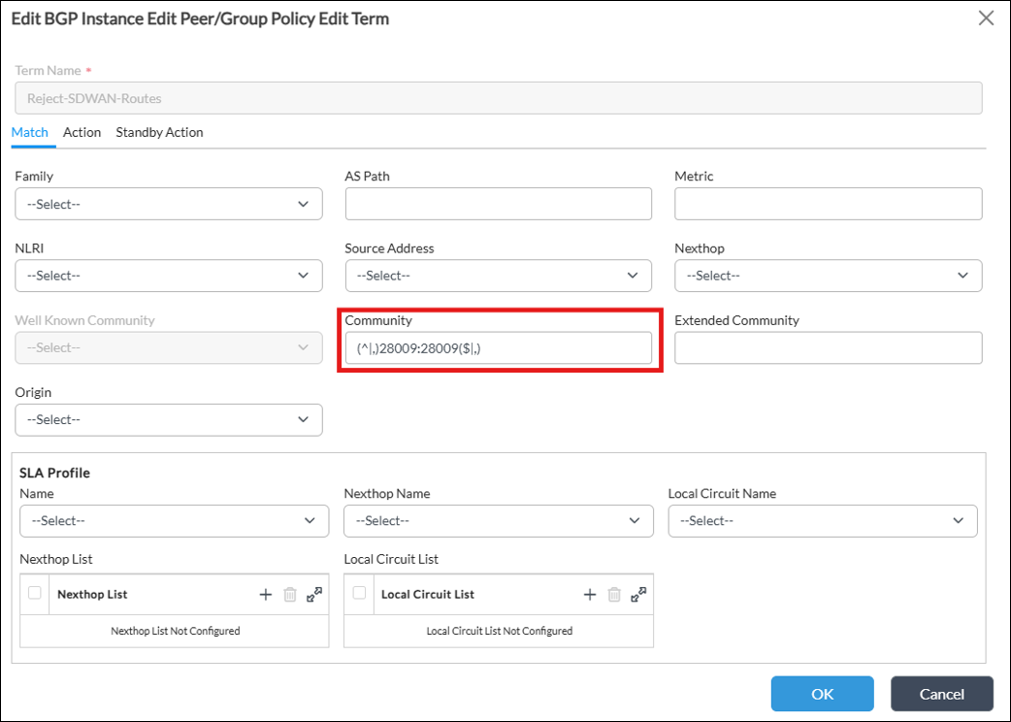 Here to note, that it’s advised to never remove those protective BGP policies based on this community, but instead to adjust them for another unique community of the Tenant.
Verification and troubleshooting commands
Commands below may help verify and/or troubleshoot operations described in this article (example outputs show the state after applying proposed changes): Verify prefixes installed into LAN-VR routing table:show route routing-instance TenantX-LAN-VRExample output:
> show route routing-instance TenantB-LAN-VR

Routes for Routing instance : TenantB-LAN-VR  AFI: ipv4  SAFI: unicast

Codes: E1 - OSPF external type 1, E2 - OSPF external type 2
IA - inter area, iA - intra area,
L1 - IS-IS level-1, L2 - IS-IS level-2
N1 - OSPF NSSA external type 1, N2 - OSPF NSSA external type 2
RTI - Learnt from another routing-instance
SUMM - SUMMARY/AGGREGATE route
+ - Active Route

Prot   Type  Dest Address/Mask   Next-hop        Age      Interface name     Nexthop name
----   ----  -----------------   --------        ---      --------------    ---------------
BGP    N/A  +0.0.0.0/0           169.254.0.4     09:58:57 tvi-0/605.0
BGP    N/A  +10.10.25.0/29       10.20.25.2      09:58:29 vni-0/5.0
conn   N/A  +10.20.25.0/29       0.0.0.0         23:23:23 vni-0/5.0
local  N/A  +10.20.25.1/32       0.0.0.0         23:23:23 directly connected
BGP    N/A  +10.30.25.0/24       10.20.25.2      09:58:57 vni-0/5.0
BGP    N/A  +10.100.22.0/24      10.20.25.2      00:00:22 vni-0/5.0
BGP    N/A  +10.200.22.0/24      7.0.0.11        13:23:52 Indirect           SPOKE-2
conn   N/A  +169.254.0.4/31      0.0.0.0         1d00h15m tvi-0/605.0
local  N/A  +169.254.0.5/32      0.0.0.0         1d00h15m directly connected
Verify prefixes received from LAN BGP peer(s) – including AS path for each prefix:
show route table ipv4.unicast routing-instance TenantX-LAN-VR receive-protocol bgpExample output:
> show route table ipv4.unicast routing-instance TenantB-LAN-VR receive-protocol bgp
Routes for Routing instance : TenantB-LAN-VR AFI: ipv4 SAFI: unicast

Prefix/Mask Next-hop MED Lclpref AS path
----------- -------- --- ------- -------
0.0.0.0/0 169.254.0.4 0 120 64513
10.10.25.0/29 10.20.25.2 0 100 65102 65200 65001
10.30.25.0/24 10.20.25.2 0 100 65102 65200
10.100.22.0/24 10.20.25.2 0 100 65102 65200 65001
Verify communities for prefixes received from LAN BGP peer(s):
show route table ipv4.unicast routing-instance TenantX-LAN-VR receive-protocol bgp detail 10.200.22.0/24 exact
> show route table ipv4.unicast routing-instance TenantA-LAN-VR receive-protocol bgp detail 10.200.22.0/24 exact

Routes for Routing instance : TenantA-LAN-VR  AFI: ipv4  SAFI: unicast

Routing entry for 10.200.22.0/24
     Peer Address        : 10.10.25.2
     Next-hop            : 10.10.25.2
     Local preference    : 100
     AS path             : 65200 65102
     AS path(. notation) : 65200 65102
     Origin              : Egp
     MED                 : 0
     Community           : 8015:0 28009:28009
     ExtCommunity        : N/A
     Scalable group tag  : 0
     Preference          : Default
     Weight              : 0
     Best                : true
Appendix: Scenario with Redundant Peerings between Tenants
For the scenarios, when there are Redundant Peerings between Tenants present, when only one should be active (Primary) in a steady state, while another one remaining as a Backup, for example, as shown on diagram below: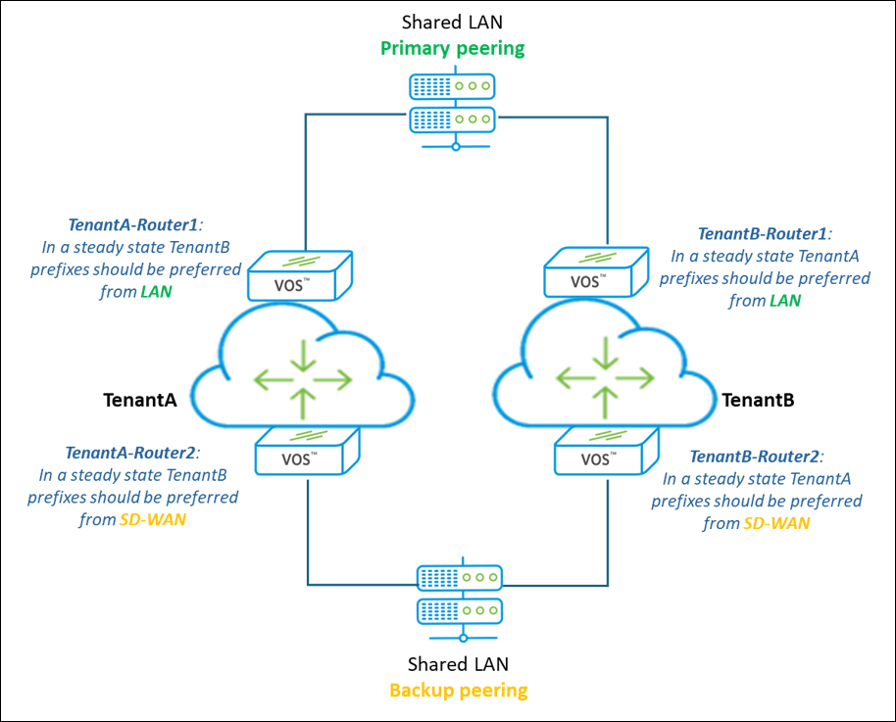
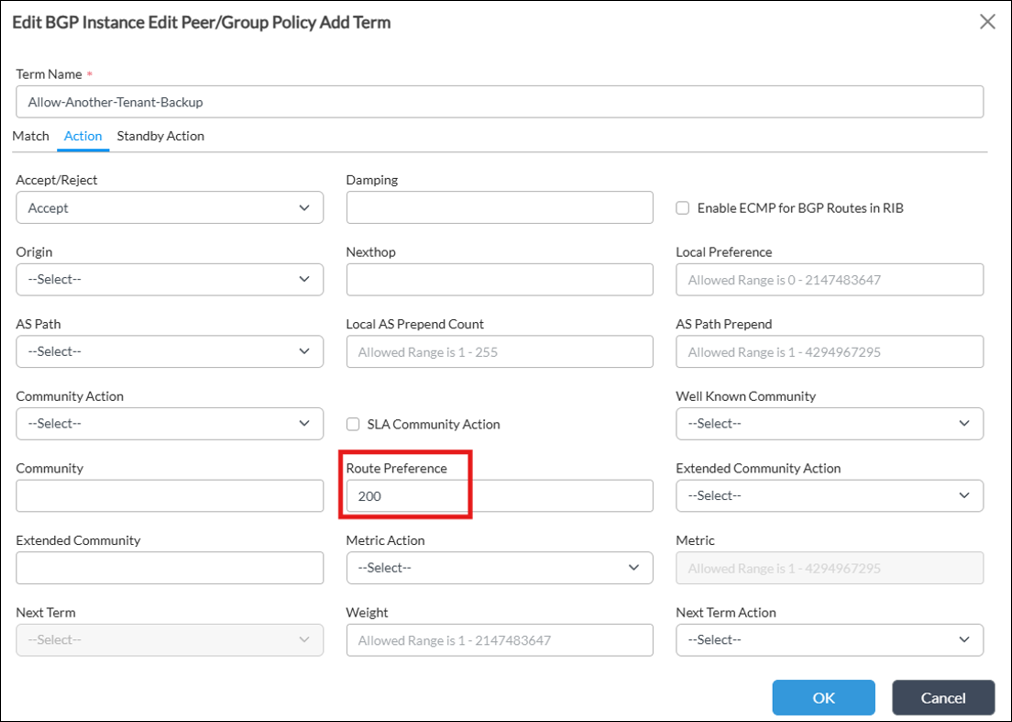
In such scenario it may be required to update Route Preference to 200 for another Tenant prefixes receive over LAN on the Backup Peering Point. This is needed to make those prefixes less preferred than SD-WAN ones in a general case.
For this it would be needed to additionally modify BGP Peer/Group Policy “Import-From-LAN-Policy” (compared to what was done in Section#4 of this article) only on Router2 of each Tenant:
Open TenantX-LAN-VR BGP instance configuration (Configuration -> Networking -> Virtual Routers -> TenantX-LAN-VR -> BGP), and switch to “Peer/Group Policy” Tab, then open “Import-From-LAN-Policy”.
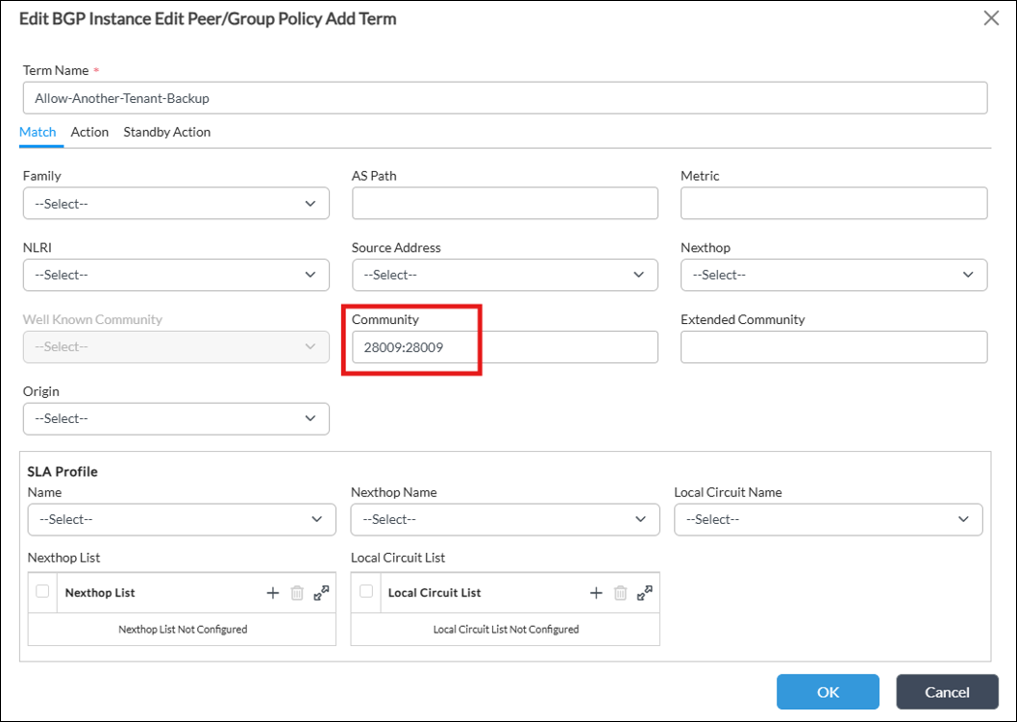
Create a new Term “Allow-Another-Tenant-Backup”, which:
- Matches another Tenant’s unique community (for example, for TenantB in this scenario it’ll be community 28009:28009):
- Sets Route Preference to 200 for it:
 Put newly created Term above “Allow-All” Term:
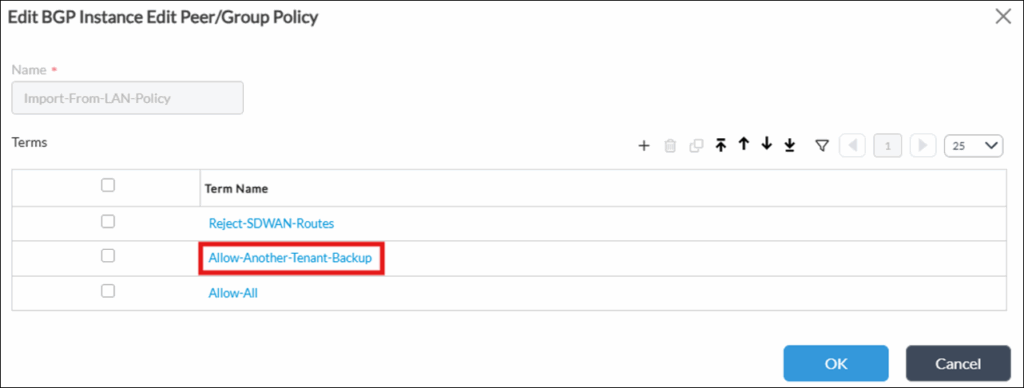 Do this for Router2 of both Tenants.
Please, keep in mind that this approach is for general scenario with default routing configuration. It may be needed to verify that adjusting Route Preference is enough to make Prefixes from Primary Peering Point preferred and it aligns with overall routing approach in your network. Some useful verification commands are provided in a Section#5 of this article (such as “show route table ipv4.unicast routing-instance TenantA-LAN-VR receive-protocol bgp detail 10.200.22.0/24 exact”)
Do this for Router2 of both Tenants.
Please, keep in mind that this approach is for general scenario with default routing configuration. It may be needed to verify that adjusting Route Preference is enough to make Prefixes from Primary Peering Point preferred and it aligns with overall routing approach in your network. Some useful verification commands are provided in a Section#5 of this article (such as “show route table ipv4.unicast routing-instance TenantA-LAN-VR receive-protocol bgp detail 10.200.22.0/24 exact”)