Written by Clement Dereu
Introduction
Versa Networks’ SD-WAN solution is composed of central headend components, such as Versa Director, Versa Analytics and Versa Controllers. In standard architecture, Hub and Branch SD-WAN devices establish secure connectivity with the Versa Controllers thanks to one or multiple shared transport domain(s) and the establishment of IPSEC tunnels, they also leverage an MP-BGP session to the Versa Controllers for distribution of routes and site-level information.
Large enterprises and service providers with many distributed sites or/and many tenants need to design robust, highly scalable, and highly flexible networks to adapt to growing business needs, and to avoid costly re-engineering of their network infrastructure.
A Hierarchical network offers powerful advantages in term of scalability, efficiency, and robustness.
Versa Networks’ SD-WAN solution can be deployed with a flexible hierarchical design by introducing new architectural elements: Hub-Controller Nodes (HCN). This document aims to give a comprehensive overview of the relevant use cases, the configuration, and the different tasks to perform to deploy Hub-Controller Nodes.
Use cases
This paragraph describes examples of cases where a Hierarchical design with HCN nodes is more suitable than the standard design.- SD-WAN Branch devices are deployed in a different transport domain than the Versa Controllers. A common situation is a branch site connected to one or multiple MPLS VPN circuits, and a Versa Controller having only internet connectivity. In this situation, there are multiple feasible solutions, one of them is to use a Hub-Controller Node to relay the connectivity from the MPLS VPN to an Internet transport domain.

- Geographically Isolated regions: There are countries where laws or regulations may constrain to connect branch SD-WAN devices with unencrypted MPLS VPN circuits rather than Internet circuits. In that situation, a design with Hub-Controller Nodes will allow to relay the connectivity between this branch device and Central headend components in another region.

- The SD-WAN solution needs to be scaled to more than 2500 Hub and Branch SD-WAN devices with one tenant. A Versa controller is limited to 2500 IPsec VPN, so having more than 2500 Hub and Branch SD-WAN devices with 1 tenant cannot be managed with a standard design. A hierarchical design lowers the number of IPsec VPN required: the Versa Controllers only need, for the unique tenant, to establish IPsec tunnels with Hub-Controller nodes. In addition, Hub-Controller nodes will also establish IPsec tunnels with the branch SD-WAN devices, but only within a region.
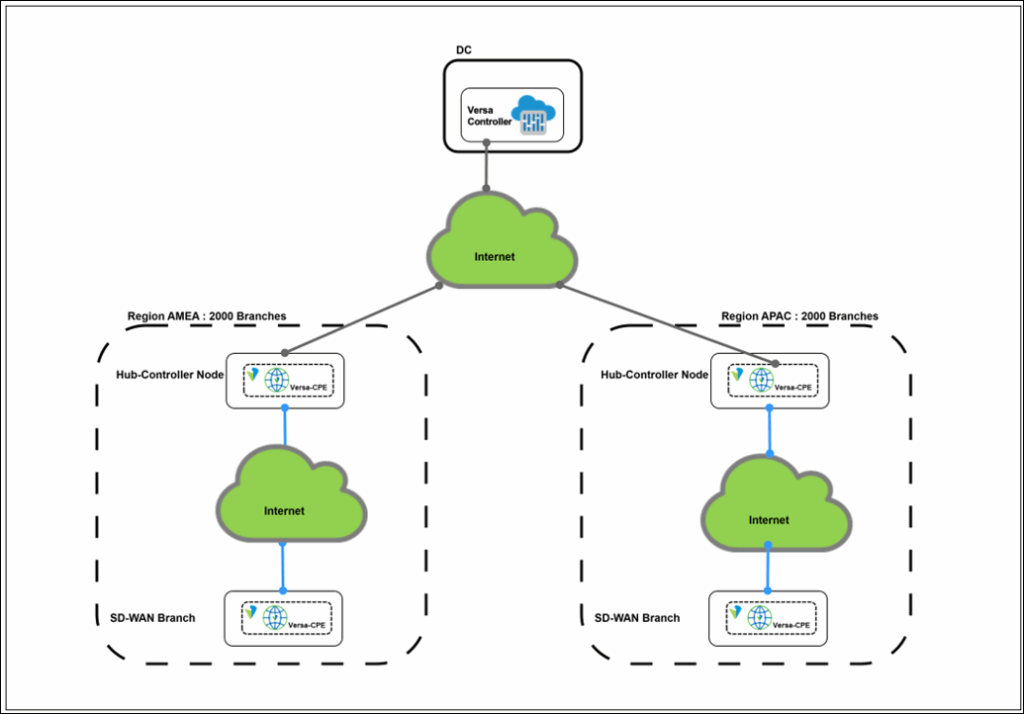
- The SD-WAN solution needs to be scaled to more than 250 Hub and Branch SD-WAN devices with 10 tenants. As designed with multi-tenancy, the control-plane of each tenant is completely separated. In a standard design, the Versa Controllers will thus establish one IPsec tunnel for each tenant to any SD-WAN branch device. With 10 tenants, the total numbers of IPsec VPN, from Versa Controllers, will reach 2500, even with only 250 SD-WAN branch devices. A hierarchical design lowers the number of IPsec VPN required.

Key Concepts
Staging IPSEC Profile and BGP Dynamic neighbor configuration are key concepts of the Versa SD-WAN solution necessary to configure VOS devices such as Controllers, and Hub-Controller nodes.
Staging IPsec Profile
Wan interfaces of Versa Controllers, and Hub-Controller Nodes, can be configured as WAN staging interfaces via the workflows. The workflow automatically creates an IPsec profile configuration that contains the settings necessary to establish an IPSEC VPN between a Versa Controller, and a SD-WAN branch device in the prestaging phase.
This configuration is visible in the Services tab of the Controller or Hub-Controller Node’s configuration:
Select IPsec > VPN Profile

BGP Dynamic neighbors
When using the workflows used to create a Versa Controller, or a Hub-Controller Nodes, a BGP configuration in the tenant Control-VR is generated with dynamic iBGP neighbors, allowing any new BGP neighbor with an IP address in the range to establish an iBGP session. This configuration is visible in the Networking tab of the Controller or Hub-Controller Node’s configuration:Select Virtual Routers > TENANT-Control-VR > BGP > Instance > Peer Group > Branches > Allow

Deploying a Hub-Controller Node
This part describes the tasks to perform to deploy a new Hub-Controller Node with the Director’s workflows.
Prerequisites
Before performing the following tasks, it is necessary to have already deployed headend nodes (Versa Directors, Versa Analytics and Versa Controllers).Workflow for template creation
First, a SD-WAN template must be created using the workflow:- Select Director View > Workflows > Template > Templates > SD-WAN > Add.
- In the Basic Tab, Select the Device Type ‘Hub-Controller’, a Region (Add a new one if needed), the subscription, the organization, and eventually Sub Organization(s) (Do not forget to click on ‘+’)

- Configure the WAN interfaces, the staging option and pool size in the Interfaces Tab.
This is required to generate the necessary configuration (Staging IPSEC profile), to later stage spoke devices and relay the connectivity from a Hub-Controller Node to the Versa Controllers
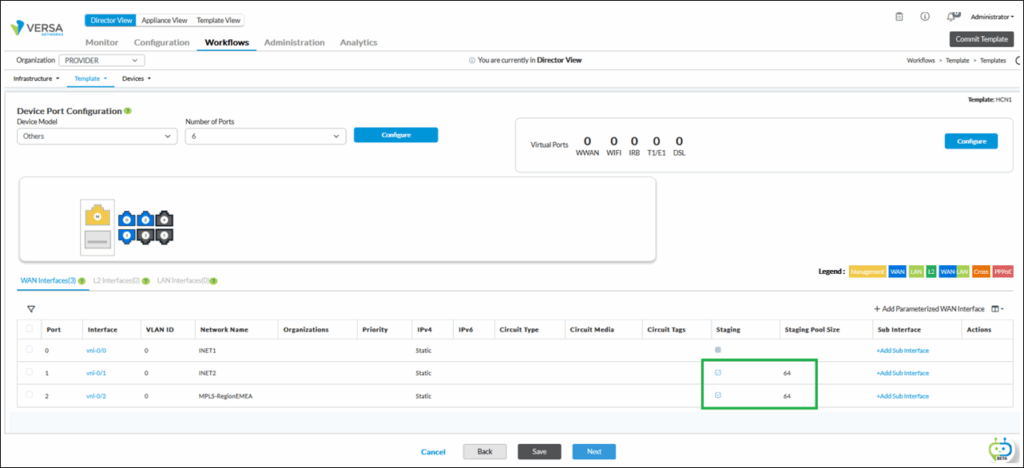

- Configure the next tabs as needed for your deployment, Review and Create the template.
Workflow for device creation
Second, a Hub-Controller device must be created using the workflow:- Select Director View > Workflows > Devices > Add.
- In the Basic Tab, Select the Organization, and the Device Group (Add a new one if needed), referencing the Post staging template created previously.
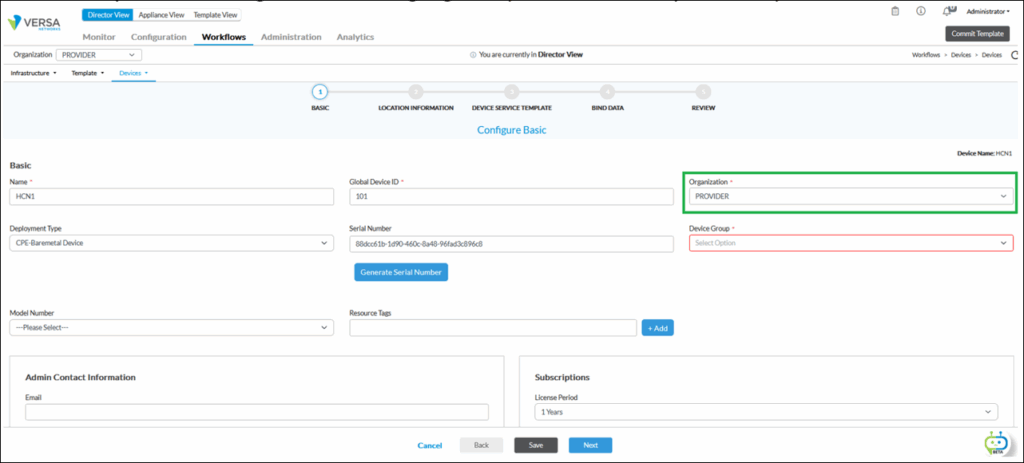
- If the Device Group is missing, create a new one with the Post staging template created previously.
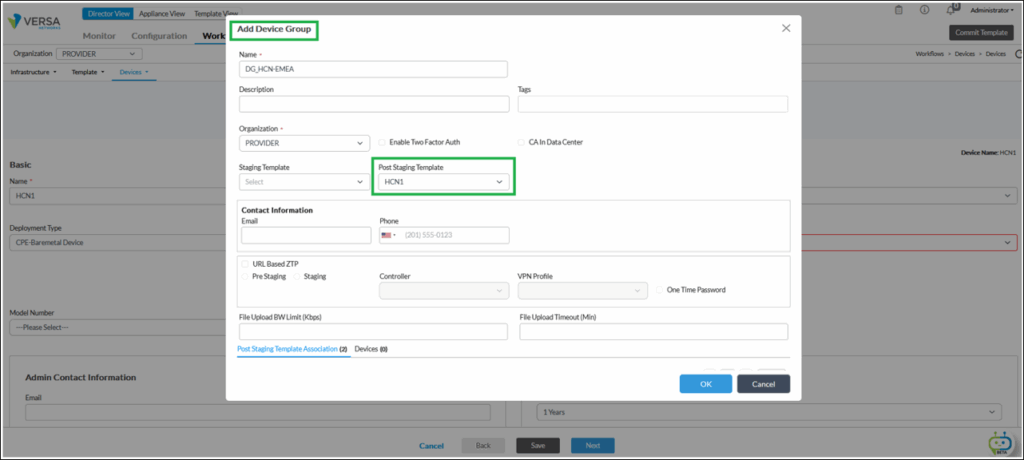
- Configure the next tabs as needed for your deployment and deploy the workflow.
Onboarding of a Hub-Controller
Third, the Hub-Controller device must be onboarded.The onboarding for a Hub-Controller device is triggered using zero-touch provisioning (Global ZTP, URL-based ZTP, from the CLI, or USB-based ZTP) the same way as for any appliance with direct reachability to a Versa Controller.
Here below, a simple example of CLI command to trigger script-ZTP where 172.16.10.31is the IP address of the controller and Controller-01-staging@PROVIDER.com is the IKE identity in the Hub Controller staging IPsec Profile.sudo /opt/versa/scripts/staging.py -n 88dcc61b-1d90-460c-8a48-96fad3c896c8 -w 0 -s 172.16.10.51/24 -g 172.16.10.1 -c 172.16.10.31 -r Controller-01-staging@PROVIDER.com -l SDWAN-Branch@PROVIDER.com => Setting up staging config => Checking if all required services are up => Checking if there is any existing config => Generating staging config => Config file saved /opt/versa/scripts/staging.cfg => Saving serial number => Check if control-plane is up and runnning => Loading generated config into CDB
Deploying a spoke device behind a Hub-Controller Node
This part describes the tasks to perform to deploy a new spoke device behind a Hub-Controller Node.
Prerequisites
Before performing the following tasks, it is necessary first to deploy the Hub-Controllers with the workflows.
Spoke Group creation
First, it is necessary to create a Spoke Group using the workflow:- Select Director View > Workflows > Template > Spoke Groups > Add.
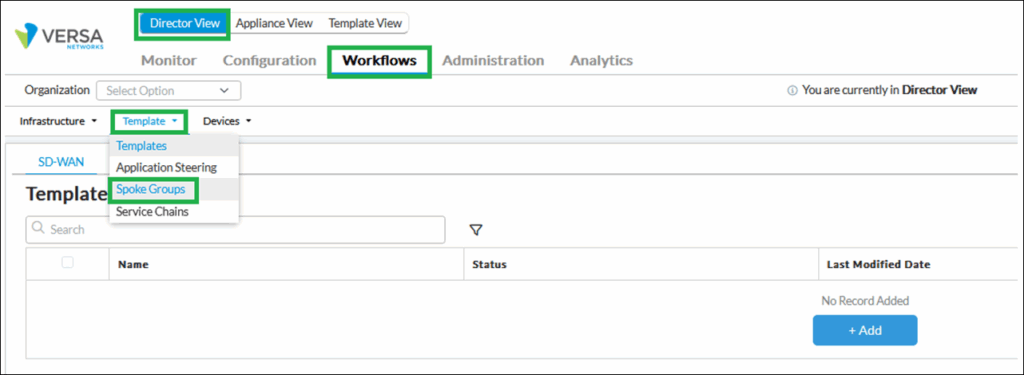
- In the Basic Tab, Select the Organization, the Region (Add a new one if needed), ‘Hub Controller’, the Spoke Group Type you want to apply, and the Priority for each of the Hub-Controller Nodes previously deployed.

Workflow for template creation
Second, a Hub-Controller device must be deployed using the workflow:
- Select Director View > Workflows > Template > Templates > SD-WAN > Add.
- In the Basic Tab, Select the Device Type ‘Spoke’, the subscription, the organization, and eventually Sub Organization(s), the Spoke Groups for each organization.
Note that the Controller field must be let blank.
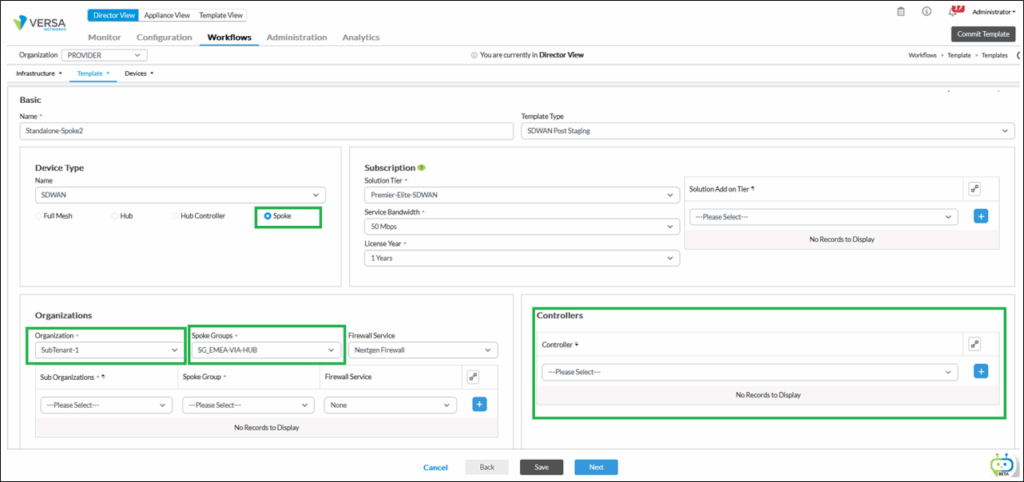
Workflow for device creation
Third, a spoke device must be deployed using the workflow:- Select Director View > Workflows > Devices > Add.
- In the Basic Tab, Select the Organization, and the Device Group (Add a new one if needed), referencing the Post staging template created previously.
- If the Device Group is missing, create a new one with the Post staging template created previously.
- Configure the next tabs as needed for your deployment and deploy the workflow.
Onboarding a spoke device through a Hub-Controller Node
Fourth, the spoke device must be onboarded.The onboarding for a spoke device through a Hub-Controller Node is the same as for any appliance with direct reachability to a Versa Controller, except that the parameters (Ip address, IPSec pre-shared keys, …) correspond to the Staging IPSEC Profile of the Hub-Controller device that you want to use to stage the spoke device.
Here below, a simple example of CLI command to trigger script-ZTP where 172.16.20.51is the IP address of the controller and HCN1-staging@PROVIDER.com is the IKE identity in the Hub Controller staging IPsec Profile.sudo /opt/versa/scripts/staging.py -n b69b4b57-ff33-474e-9875-686102784ec2 -w 0 -s 172.16.20.57/24 -g 172.16.20.1 -c 172.16.20.51 -r HCN1-staging@PROVIDER.com -l SDWAN-Branch@PROVIDER.com => Setting up staging config => Checking if all required services are up => Checking if there is any existing config => Generating staging config => Config file saved /opt/versa/scripts/staging.cfg => Saving serial number => Check if control-plane is up and runnning => Loading generated config into CDB
Summary
This document provided information about the use-cases where configuring a Hierarchical SD-WAN network with Hub-Controllers is necessary.
It also describes Staging IPSEC profile and BGP Dynamic neighbors’ configurations.
Finally, it gave an overview of all the tasks to perform to deploy Hub-Controllers and spoke devices behind Hub-Controllers with workflows and staging scripts.
Additional information
https://docs.versa-networks.com/Secure_SD-WAN/01_Configuration_from_Director/SD-WAN_Configuration/Configure__SD-WAN_Topologies/Configure_Regional_Hub-and-Controller_Nodes_for_SHHS_Topologies
https://docs.versa-networks.com/Secure_SD-WAN/01_Configuration_from_Director/SD-WAN_Configuration/Configure__SD-WAN_Topologies/Versa_SD-WAN_Topology_Constructs_Based_on_BGP_Attributes
https://academy.versa-networks.com/wp-content/uploads/2024/03/Versa-SDWAN-Design-Guide-V1.2.pdf?ver