by Kyle Murray
Introduction
Versa’s Unified Secure Access Services Edge (SASE) delivers converged single stack network security (Secure SD-WAN and Secure Service Edge) that simplifies SASE deployment and operations through single pane of glass management. However, there are customers with SD-WAN hosted by a service provider on behalf of the enterprise or hosted on the enterprise directly, where Versa’s cloud hosted Secure Service Edge (SSE) will be leveraged to secure internet (VSIA) and/or intranet (VSPA) bound traffic. In this architecture, IPSec and/or GRE tunnels are used to integrate the SD-WAN with the Versa hosted SSE cloud.
For enterprises that would like to automate and standardize tunnel configurations to Versa hosted SSE Gateways, Versa provides a full set of RESTful APIs. The Versa management platform includes Swagger API documentation that can be referenced to facilitate the use of Versa RESTful APIs. This document will focus on the APIs that can be used to automate the creation of SSE site-to-site tunnels.
Additional documentation on this architecture can be found on the Versa Docs Portal to include the following.
Prerequisites and Requirements
The items listed below are prerequisites and/or requirements to successfully configure site-to-site tunnels via Concerto API. In most cases, users leverage Versa hosted SASE Gateways and securing unknown prerequisites can be accomplished by submitting a request to Versa Support.
- Whitelisted public IP address(es) for API access.
- Concerto or API Gateway URL.
- OAuth Client ID and Client Secret.
- Concerto Username and Password with proper Role Based Access.
- Pertinent SASE Gateway hostname(s) and Public IP address(es).
- If Versa Concerto and SASE Gateways are not Versa hosted, the unknown prerequisites can be secured from the provider hosting the environment.
Concerto Site-to-Site Tunnel API
There are 5 steps required in the API based site-to-site tunnel configuration. The user performing the API configuration must first request an OAuth Token (POST), then query (GET) the Tenant and Gateway Universal Unique Identifiers (UUID). The API used to configure site-to-site tunnels is then performed (POST) followed by publishing (PUT) the configuration.

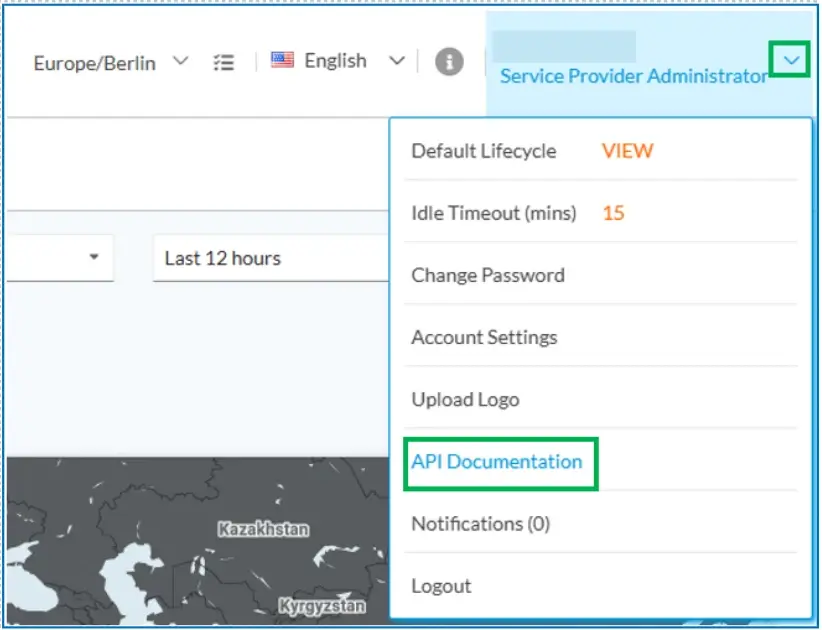
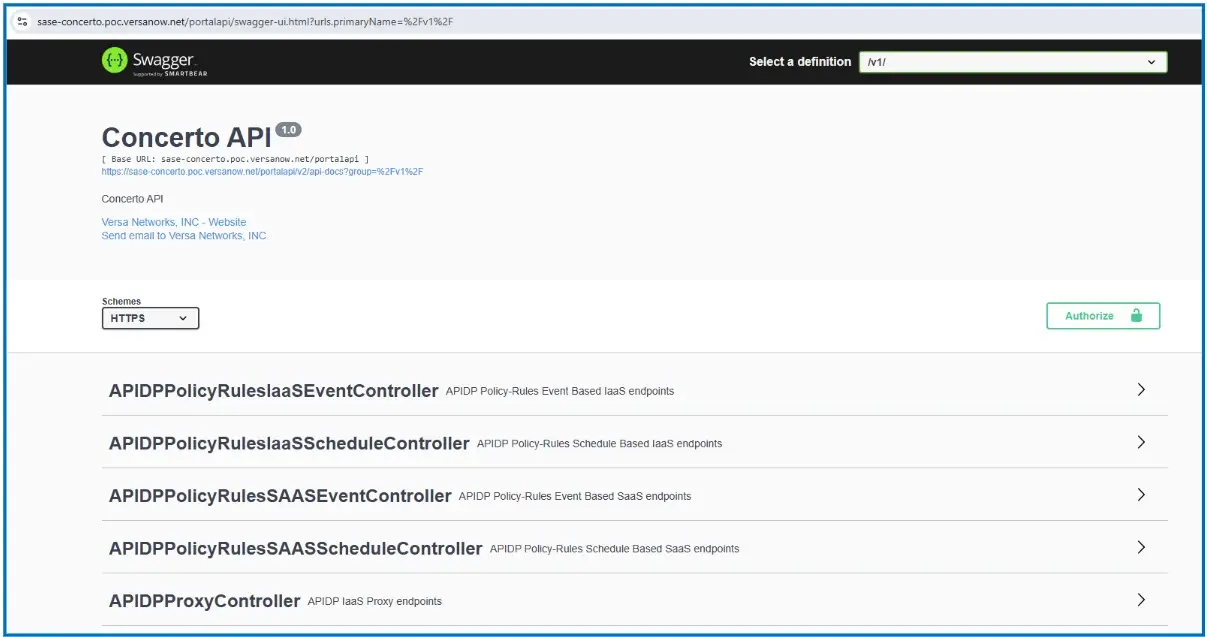
Detailed information regarding the required API calls can be found via the built in Swagger API documentation. To access the Swagger Concerto API reference, click on the drop-down arrow in the top right corner of the Concerto UI and select API Documentation. Concerto API reference can also be accessed via URL (https:///portalapi/swagger-ui.html) after signing into Concerto UI.
Step 1 – OAuth Token
An OAuth token will be used to authenticate API calls, and the first API call is to request an OAuth Token from Concerto. The POST API call to request an OAuth token (v1/auth/token) can be found in Swagger and requires Client ID, Client Secret, username and password in the request body (JSON).

The Postman application is used below to show an OAuth API call and response example. Variables can be seen within the double brackets ( {{ }} ).
The {{concerto_url}} variable below represents the Concerto or API Gateway URL used for Concerto API calls.

As mentioned earlier, the OAuth API call body (JSON format) requires the Client ID, Client Secret, username and password. Below is the JSON body required where the variables must be replaced by the relevant information. This JSON body for required information is also available in Swagger.

The “access_token” field in the response is the OAuth access token that can be used to authenticate for future API calls.

Step 2 – Tenant UUID:
The second step is a GET API call used to identify the tenant UUID so that site-to-site tunnels are created under the proper tenant. The tenant UUID can be obtained by name (in example below) or by querying a summary of all configured tenants. The API call to request tenant information by name (/v1/tenants/tenant/name/{tenant-name}) and the API call to request a summary of configured tenants (/v1/tenants/summary?hierarchical=true) can be found in Swagger.


The Postman application is used below to show a Tenant UUID API call (by name) and response example. Variables can be seen within the double brackets ( {{ }} ).
The {{concerto_url}} variable below represents the Concerto or API Gateway URL used for Concerto API calls and the {{tenant_name}} variable is the name of the tenant that is being queried.

The “uuid” field in the response is the Tenant by name API call is the tenant UUID for future API calls.

Step 3 – Gateway UUID:
In order to finalize the site-to-site tunnel creation in a future step (Step 5 – Publish), the SASE Gateway that hosts the site-to-site tunnel must be identified by UUID. The third step is a GET API call to identify the SASE Gateway UUID (/v1/tenants/{tenant-uuid}/sasegateways) can be found in Swagger.

The Postman application is again used below to show a Gateway UUID API call and response example. Variables can be seen within the double brackets ( {{ }} ).
The {{concerto_url}} variable below represents the Concerto or API Gateway URL used for Concerto API calls and the {{tenant_name}} variable is the name of the tenant that is being queried.

The “uuid” field in the response is the SASE Gateway UUID that will be used to configure the site-to-site tunnel.

4 – Site-To-Site Tunnels
The fourth step will be perform a Site-to-Site tunnel (IPSEC or GRE) POST API call. The POST API call to create a site-to-site tunnel (/v1/tenants/{{tenant_uuid}}/sase/site-to-site-tunnels) can be found in Swagger.

The Postman application is used below to show a Site-to-Site Tunnel creation API call and response example. Variables can be seen within the double brackets ( {{ }} ).
The {{concerto_url}} variable below represents the Concerto or API Gateway URL used for Concerto API calls and the {{tentat_uuid}} variable is the tenant UUID received in the previous API call response.

Below is the JSON body required where the variables must be replaced by the relevant information. This JSON body for required information is also available in Swagger.
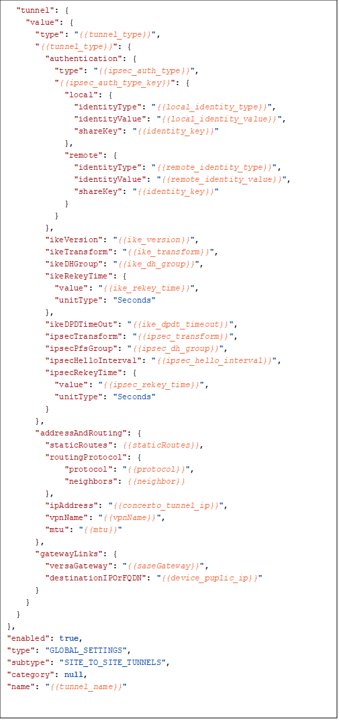
The table below details the corresponding values to variables in the required Site-to-Site Tunnel body. Please note that in this step, the SASE Gateway is identified by hostname. However, when publishing the configuration (next step) both the SASE Gateway hostname and UUID (identified in the Gateway UUID response in a previous step) will be required.
| tunnel_type | ipsec or gre |
| tunnel_type | PSK |
| ipsec_auth_type_key | psk |
| local_identity_type | psk |
| local_identity_value | value based on “local_identity_type” |
| identity_key | pre-shared key value |
| remote_identity_type | email, FQDN, or IP |
| remote_identity_value | value based on “remote_identity_type” |
| identity_key | pre-shared key value |
| ike_version | v1, v2, v2-or-v1 |
| ike_transform | 3des-md5, 3des-sha1, aes128-sha1, aes128-md5, aes256-sha1, aes256-md5, aes128-sha256, aes256-sha256, aes128-sha384, aes256-sha384, aes128-sha512, aes256-sha512 |
| ike_dh_group | mod1, mod2, mod5, mod14, mod15, mod16, mod19, mod20, mod21, mod25, mod26, mod-none |
| ike_rekey_time | 132-86400 |
| ike_dpdt_timeout | 0-36000 |
| ipsec_transform | esp-aes128-sha1, esp-3des-md5, esp-3des-sha1, esp-aes128-ctr-sha1,esp-aes128-ctr-xcbc, esp-aes128-gcm, esp-aes128-md5, esp-aes128-sha256,esp-aes128-sha384, esp-aes128-sha512, esp-aes256-gcm, esp-aes256-md5,esp-aes256-sha1, esp-aes256-sha256, esp-aes256-sha384, esp-aes256-sha512,esp-null-md5 |
| ipsec_dh_group | mod1, mod2, mod5, mod14, mod15, mod16, mod19, mod20, mod21, mod25, mod26, mod-none |
| ipsec_hello_interval | 0-36000 |
| ipsec_rekey_time | 132-86400 |
| staticRoutes |
example if required.  If not required us [ ]:
[
    {
        "destination": "10.11.1.0/24",
        "preference": "10"
    }
]
|
| protocol | none or EBGP |
| neighbor |
If none [ ], if EBGP example below (*import/export policy will use
uuid for policy as opposed to policy name):

 [
    {
      "address": "169.254.254.2",
      "asn": "65100",
      "password": "",
      "importPolicy": "0f035560-969f-4cbe-80d3-bab1985dc307",
      "exportPolicy": "0f035560-969f-4cbe-80d3-bab1985dc307"
    }
  ]
|
| concerto_tunnel_ip | Concerto/SSE Tunnel IP with Subnet Mask. |
| vpnName | VPN / Enterprise VR Name |
| saseGateway | SASE Gateway Hostname |
| device_puplic_ip | Tunnel Distant End Public IP Address |
| tunnel_name | Tunnel Name |
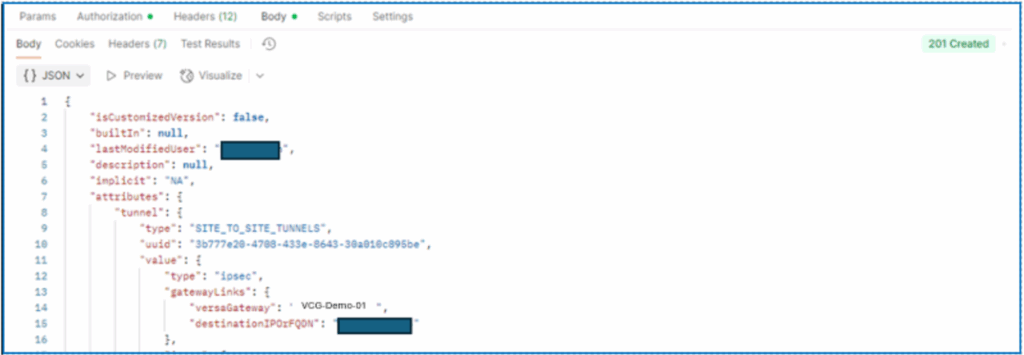
When sending the API call in Postman, the response below should be received upon successful creation of the tunnel.
5 – Publish
The Site-to-Site Tunnel has now been configured via API and in the last step, the configuration must be published to the associated SASE Gateway. The API call to request to publish to a SASE Gateway (/v1/tenants/{{tenant_uuid}}/gateways/publish) can be found in Swagger.

The Postman application is used below to show a Publish API call and response example. Variables can be seen within the double brackets ( {{ }} ).
The {{concerto_url}} variable below represents the Concerto or API Gateway URL used for Concerto API calls.

Below is the JSON body required where the variables must be replaced by the relevant information. Both the SASE Gateway hostname ( {{sase_gw_name}}) and UUID ({{sase_gw_uuid}}) obtained in previous API calls are required. This JSON body for required information is also available in Swagger.

When sending the API call in Postman, the response below should be received upon successful Publish.

The steps to perform API based site-to-site tunnel configuration have been completed and a site-to-site tunnel has been created. The site-to-site tunnel can now be used for communication to Versa SSE gateways to secure internet and intranet bound traffic.
Example Multi-Tunnel Automation
The number of Site-to-Site Tunnels configured using the above API call process can be scaled up to configure multiple tunnels simultaneously and standardize tunnel configuration across the Enterprise. Scaling up the number of tunnels configured can be done via existing enterprise automation tools, and Python will be used in the below example.
Please note that the example automation covered below can be found on Versa’s publicly accessible GitLab site for reference. The example automation is use at your own risk and should be fully tested prior to use in production environments.

The flow diagram above details the process used by the example automation (Python). For clarity of this document, the process has been broken up into 6 steps.
Step 1 – Batch File
Step 2 – Run Script (sse_onprem_S2S.py) / Access Granted
Step 3 – Select SSE Gateway / Select Customer VPN from List
Step 4 – Tunnel Type / Parameters
Step 5 – Dynamic (eBGP) / Static Routing
Step 6 – Script Runs (Configuration and Publish) with Terminal Output and Logging
Step 1 – Batch File (.csv)
As can be seen in the flow diagram, the first step in the process is a batch file in .csv format. This batch file is a data set for specific site-to-site tunnels to be configured and includes columns for both distant end (on-prem router) and local (SSE Gateway) information. Below are the details of the information for each column.

Please note that the .csv data set uses Versa SD-WAN specific column names in the event that Versa SD-WAN is used as the on prem router. An additional Python script is available on the Versa public GitLab for Versa Director based tunnel configuration that can be used in conjunction with the Versa Cloud Gateway configuration. Additional details for the Versa Director script can be found on the GitLab but will not be covered in depth in this document.
If the Versa Director script is not used for on-prem routers, then the device name and device template columns will only be used for tunnel naming.
Step 2 – Run Script (sse_onprem_S2S.py) / Access Granted
Once the batch file has been filled in, the script (sse_onprem_S2S.py) can be run to configure site-to-site tunnel on Versa Cloud Gateways (managed by Concerto). User input will then be requested for the name of the batch file to be used as well as the management platform URL (or API GW URL) and authentication information (see Prerequisites and Requirements).

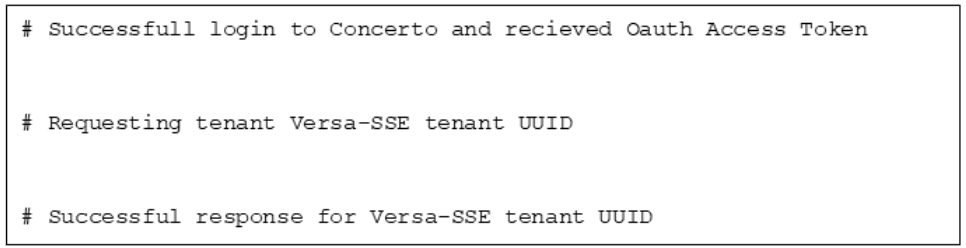
Login to Versa Concerto will then be performed using the supplied user input information to include requesting the UUID for the identified tenant. Should any of the information supplied be incorrect, a warning will be returned, and the script will need to be run again.
Step 3 – Select SSE Gateway / Select Customer VPN from List
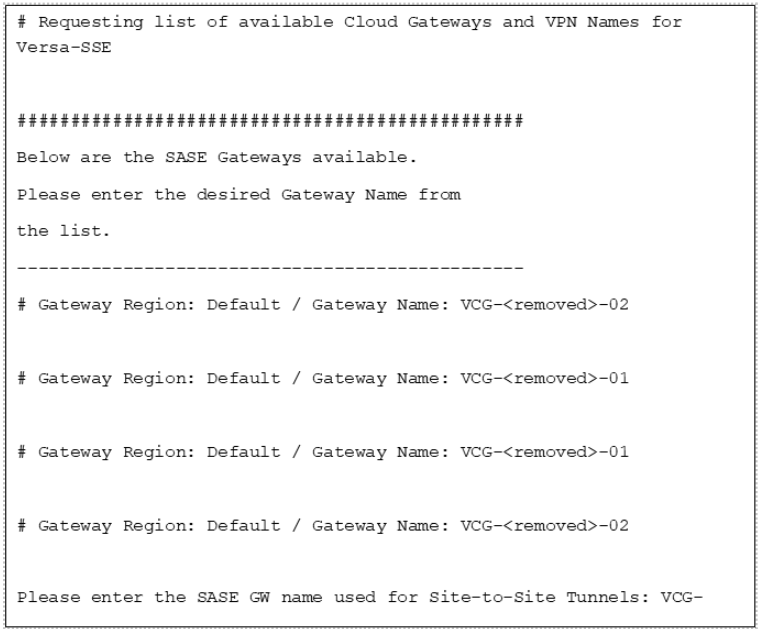
The Versa SASE Gateways configured for the identified tenant are then queried and displayed including the gateway region. A SASE Gateway from the list must then be provided by the user (script can be run for a single gateway at a time).
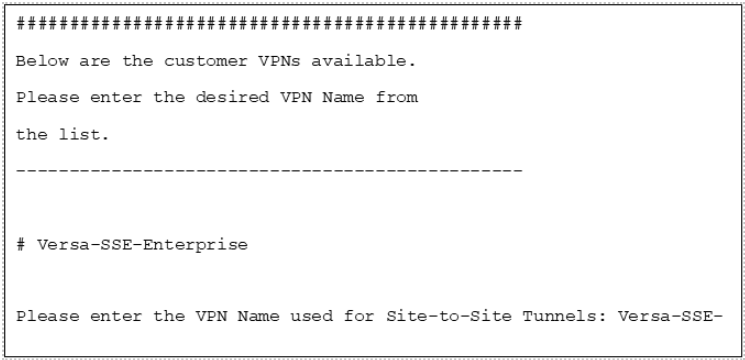
A list of the customer VPNs is then displayed. A customer VPN from the list must be provided by the user.
Step 4 – Tunnel Type / Parameters
The user is then prompted to choose which type of tunnel, IPSec or GRE, is required. For demonstration purposes, IPSec is selected below.
When IPSec is selected, the user is then shown default IKE and IPSec parameters and asked if the default parameters should be used or custom parameters are required. If default parameters are used (y) then the displayed values are used. If custom parameters are required (n), then the options are displayed for selection of each parameter (not shown in screenshot below).
The default parameters can also be changed in the script (sse_onprem_S2S.py) itself to set default to enterprise requirements. This can be done by searching for “# default IKE / IPSEC configuration” in the script and updating the default values.

Step 5 – Dynamic (eBGP) / Static Routing
Dynamic (eBGP) or static routing configuration information will then be requested.
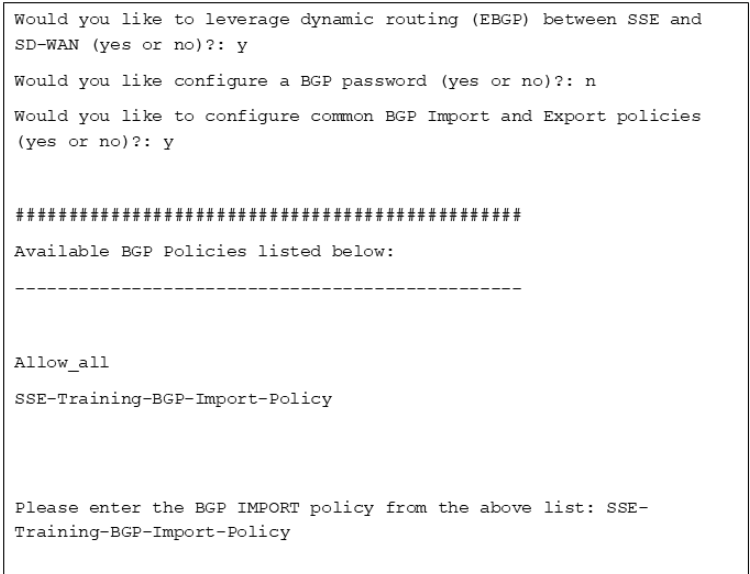
If dynamic routing is selected, the user will then be asked if a BGP password is required. If the answer is yes, then a password will be requested.
Following BGP password response, the user will be asked if import / export policies should be configured. If the answer is yes, Concerto will be queried for the configured BGP policies and the user can identify which policy to use as import and which policy to use as export.
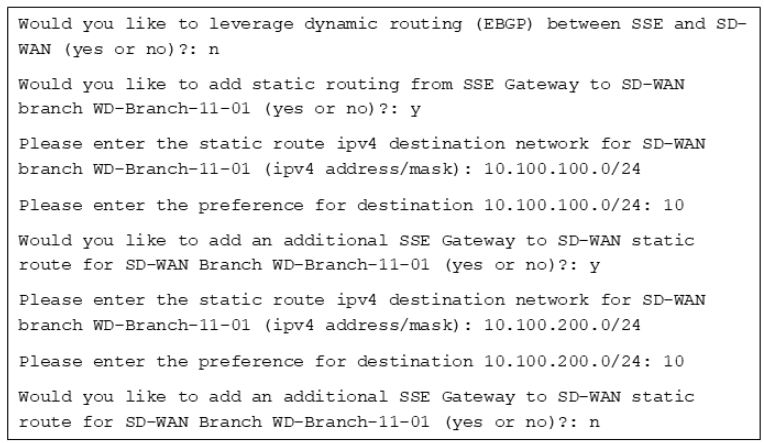
If static routing is selected, the user will be requested to provide the destination (IP address / subnet mask) and preference for static routes. As seen below, multiple static routes can be configured per destination branch.
Step 6 – Script Runs (Configuration and Publish) with Terminal Output and Logging
The information to the configuration has now been provided by the user and the configuration will progress. Output of progress will be displayed in the terminal and saved in output logging files. The output will include the name of the distant end sites, the Concerto Task ID, connection to the Publish Stream for progress, and confirmation that the sites have been configured and published.